VDC quotas and resources
Quotas are a property of a VDC, rather than of individual objects within it. They are set during
creation (vdc-create) and changed through updates (vdc-set); they are read together with
usage counters in a single vdc-list call. An empty value (null)
means that no limit is set for that resource.
Networks are accounted for separately from quotas. A network is a cluster-level object: it enters a VDC through assignment, and its address capacity is restricted by a limit on the VDC↔network pair. A single limit does not apply to two VDCs on a shared network; a value is set for each pair.
Quotas
There are five fields, each limiting its own resource. vdc-create accepts a value
as a number or a string ("" and null produce null) and deserializes it to i32;
vdc-set accepts a number or null.
| Field | Resource limited |
|---|---|
quota_ram_gb | RAM, GB |
quota_space_gb | Disk space, GB |
quota_cpu_ghz | CPU frequency, GHz |
quota_cpu_cores | CPU cores |
quota_space_snapshots | Snapshot space |
quota_space_gb limits the total space for the VDC: virtual machine disks
and storage volumes are added together. A tenant that has exhausted the quota
with volumes cannot add or expand a VM disk. Starting existing machines is not
subject to this rule: a tenant can power on their own powered-off machine even when
the quota is exhausted.
You cannot lower quota_space_gb below the space actually used: vdc-set rejects
such a value with code -3309 and includes the requested limit and current
space usage in the message. A rejected value is not applied; the limit can always
be removed entirely (null).
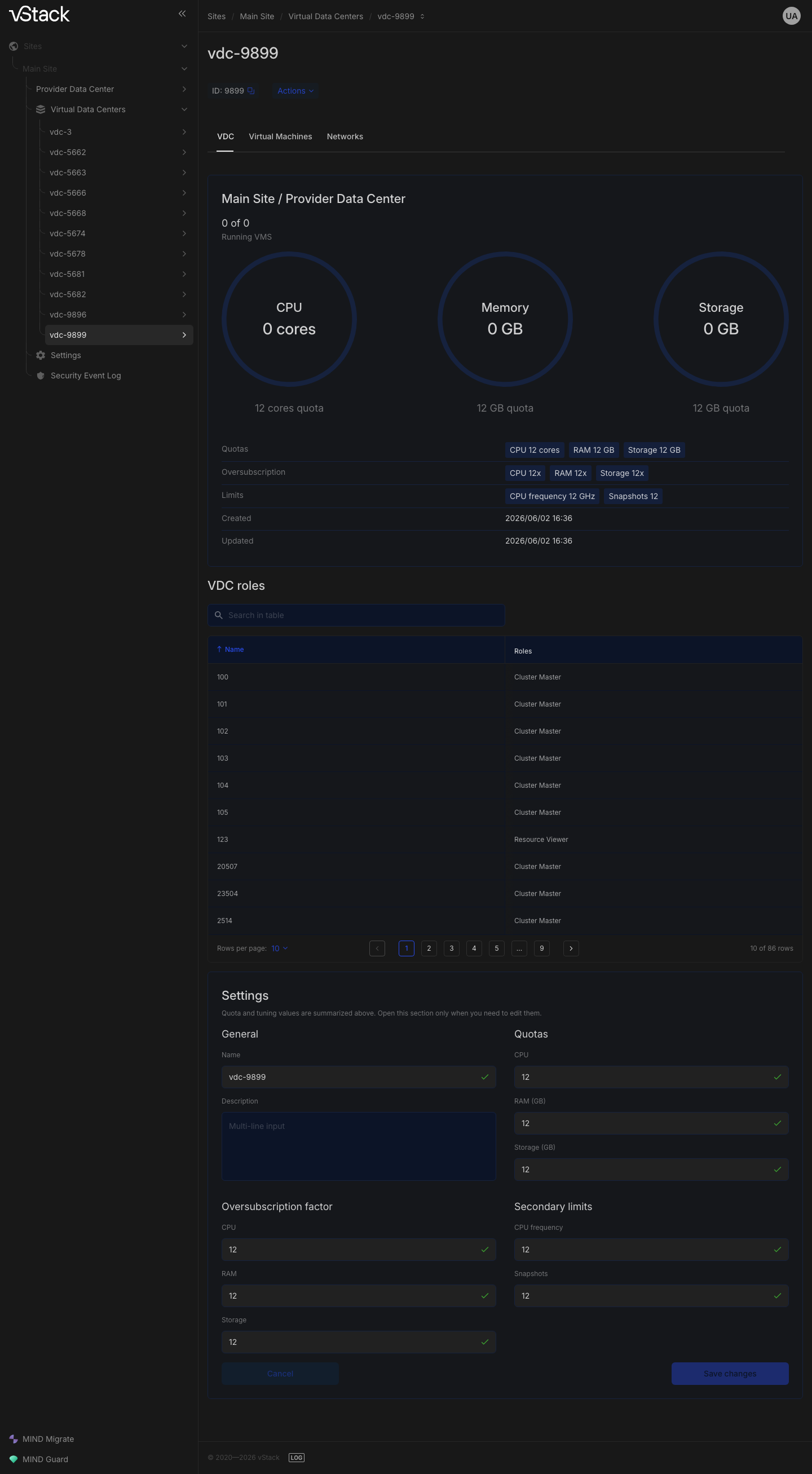
Oversubscription factors
There is one factor for each quota. Values are deserialized to f64:
unlike the quotas themselves, factors can be fractional. The input rules are the same: vdc-create
accepts a number or a string, and vdc-set accepts a number or null.
| Field | Corresponding quota |
|---|---|
quota_oversubscription_rate_ram | quota_ram_gb |
quota_oversubscription_rate_space_gb | quota_space_gb |
quota_oversubscription_rate_cpu_ghz | quota_cpu_ghz |
quota_oversubscription_rate_cpu_cores | quota_cpu_cores |
quota_oversubscription_rate_space_snapshots | quota_space_snapshots |
Counters and usage accounting
vdc-list returns a complete record for each accessible VDC: identification,
the calling user's role, quotas, factors, and usage.
| Field | Meaning |
|---|---|
id, name, description | VDC identification |
created, modified | Creation and last modification timestamps |
role_id, role_name | The calling user's role in this VDC |
vms_total, vms_running | Total VMs and running VMs |
cpu_running | CPU usage by running VMs |
ram_usage | RAM usage |
space_gb_used | Space used, GB: VM disks and storage volumes combined |
cpu_cores_quota_usage | CPU core usage relative to the quota |
ram_quota_usage | Memory usage relative to the quota |
space_quota_usage | Disk space usage relative to the quota |
Response to a request without parameters:
{
  "jsonrpc": "2.0",
  "id": "cbf4478c-84b5-45ac-97cd-0390d7190585",
  "result": {
    "code": 1,
    "data": [
      {
        "id": 2,
        "name": "vdc_name",
        "description": null,
        "created": 1710000000,
        "modified": 1710000000,
        "role_id": 2,
        "role_name": "vDC admin",
        "quota_cpu_cores": null,
        "quota_cpu_ghz": null,
        "quota_ram_gb": null,
        "quota_space_gb": null,
        "quota_space_snapshots": null,
        "quota_oversubscription_rate_cpu_cores": null,
        "quota_oversubscription_rate_cpu_ghz": null,
        "quota_oversubscription_rate_ram": null,
        "quota_oversubscription_rate_space_gb": null,
        "quota_oversubscription_rate_space_snapshots": null,
        "cpu_cores_quota_usage": null,
        "cpu_running": 0,
        "ram_quota_usage": null,
        "ram_usage": 0,
        "space_gb_used": 0,
        "space_quota_usage": null,
        "vms_running": 0,
        "vms_total": 0
      }
    ]
  }
}
This VDC has no quotas: all quota_* fields are empty, as are the relative fields
(*_quota_usage), because there is no value against which to calculate a ratio. Absolute counters
are still populated and equal to zero.
The objective format
The optional objective parameter changes the shape of the vdc-list response: instead of
an array, it returns an object whose keys are VDC IDs and whose values are the same
records. The format is enabled by the presence of the field; the parameter's value does not matter. This
saves the client from iterating over an array when looking up a VDC by id.
Networks assigned to a VDC
| Method | Purpose | Access |
|---|---|---|
vdc-assign-network | Assign a network to a VDC | Cluster master or the network creator with a VDC-level role (role_id <= 2) |
vdc-deassign-network | Remove a network assignment | Same requirements |
vdc-networks | Networks assigned to accessible VDCs | Any user; the response is limited to accessible VDCs |
vdc-network-addr-limit | Address limit for a VDC↔network pair | Cluster master |
vdc-assign-network and vdc-deassign-network accept the same pair of
parameters: vdc_id and network_id, both required. A successful response has
an empty data field.
Assignment request:
{
  "jsonrpc": "2.0",
  "method": "vdc-assign-network",
  "params": {
    "vdc_id": 10,
    "network_id": 42
  },
  "id": "cbf4478c-84b5-45ac-97cd-0390d7190585"
}
Unassignment is more restrictive: a network with ports assigned to VMs cannot be unassigned. The
-2206 response gives the number of such ports. Disconnect the VMs from the network, then repeat
the call.
The vdc-networks response is a nested object: the outer keys are VDC IDs;
inside are the VDC's id and name, plus records for assigned networks, each keyed by
its ID. Each network record includes addr_limit, the current address limit
for that VDC↔network pair, alongside the network's own parameters: type and transport
(network_type_id, backend), tags vlan_id and qinq_id, and VXLAN parameters
(vxlan_multicast_addr, vxlan_port). Fields that do not apply to this network type
are empty (null):
{
  "jsonrpc": "2.0",
  "id": "cbf4478c-84b5-45ac-97cd-0390d7190585",
  "result": {
    "code": 1,
    "data": {
      "10": {
        "id": 10,
        "name": "vdc_name",
        "42": {
          "addr_limit": 32,
          "backend": 2,
          "creator": 1,
          "id": 42,
          "mtu": 1500,
          "name": "net",
          "net_cidr": "192.0.2.0/24",
          "network_type_id": 2,
          "vlan_id": null,
          "qinq_id": null,
          "vxlan_multicast_addr": "239.0.0.1",
          "vxlan_port": 9009
        }
      }
    }
  }
}
Address limit for a VDC↔network pair
The vdc-network-addr-limit method is available only to Cluster master.
| Parameter | Type | Required | Constraints |
|---|---|---|---|
vdc_id | Number | Yes | At least 0 |
network_id | Number | Yes | At least 0 |
addr_limit | Number or null | Yes | At least 0; an empty string is not allowed |
Request:
{
  "jsonrpc": "2.0",
  "method": "vdc-network-addr-limit",
  "params": {
    "vdc_id": 10,
    "network_id": 42,
    "addr_limit": 32
  },
  "id": "cbf4478c-84b5-45ac-97cd-0390d7190585"
}
The operation order is fixed: a limit can be set only on a network that is already assigned. If
the network is not assigned to the VDC, the response is -23030 and identifies the pair. Run
vdc-assign-network first.
Roles assigned in a VDC
vdc-roles accepts the VDC id and is available only to Cluster master. The response is an
assignment map: each key corresponds to a list of role IDs granted in
this VDC.
{
  "jsonrpc": "2.0",
  "id": "cbf4478c-84b5-45ac-97cd-0390d7190585",
  "result": {
    "code": 1,
    "data": {
      "12": [2, 3],
      "15": [4]
    }
  }
}
The -403 rejection ("Access denied") means that the call was not made by a Cluster master.
VDC resource error codes
In each code pair, the first code belongs to vdc-assign-network and the second to
vdc-deassign-network: the methods perform the same checks but use separate
sets of error codes. In the messages, <vdc> and <net> are IDs from the request;
the server substitutes their actual values.
| Code | Message | When returned |
|---|---|---|
-2102, -2203 | "No params at all" | The request has no params object |
-403 | "Access denied" | There are no grants for the VDC in the request, or a grant exists but the role is below the required level; both cases use the same permission rejection |
-2108, -2218 | "You ain't the creator of network" | A VDC-level role without cluster permissions, and the network was created by another user |
-2120, -2220 | "Network id does not exist" | No network exists with this network_id |
-2121, -2221 | "Bad vdc_id param value" | vdc_id is missing or outside the allowed range |
-2122, -2222 | "Bad network_id param value" | network_id is missing or outside the allowed range |
-2206 | "There are N ports assigned to VMs" | A network is being unassigned from a VDC while VM ports are still assigned |
-2207 | "Error upon network ID==<net> deassignment from vDC ID==<vdc>" | Network unassignment fails |
-23020 | "No param addr_limit" | The required addr_limit is missing from the request |
-23022 | "Bad addr_limit" | The addr_limit value fails validation |
-23030 | "network_id==<net> has not been assigned to vdc_id==<vdc>, so limit can't be set" | A limit is being set on a network that is not assigned to the VDC |