How to create and manage a network
When to use
Use this procedure when virtual machines need a new network with its own subnet for a separate environment or project isolation. This guide takes you from network creation through deletion.
Assigning addresses to a specific machine and excluding addresses from the pool are covered separately. See Address pool and VM addressing.
Prerequisites
- The Cluster master role for networks of any type, including Routed and Q-in-Q.
- The
vDC adminrole or higher for Isolated and GENEVE; Routed and Q-in-Q are not available to this role. - A subnet selected in advance: IPv4 with a prefix from /16 to /29.
- For Q-in-Q, both VLAN tags: outer and inner.
- vStack Center version 3.0.4.
Creating a network
A network is created as a complete object: the type, subnet, gateway, MTU, and VLAN tags are set in one form and cannot be changed after creation. Only the name can be changed later.
-
Open
Provider Data Center→All Networks. -
Click
Addabove the table to open the network creation form.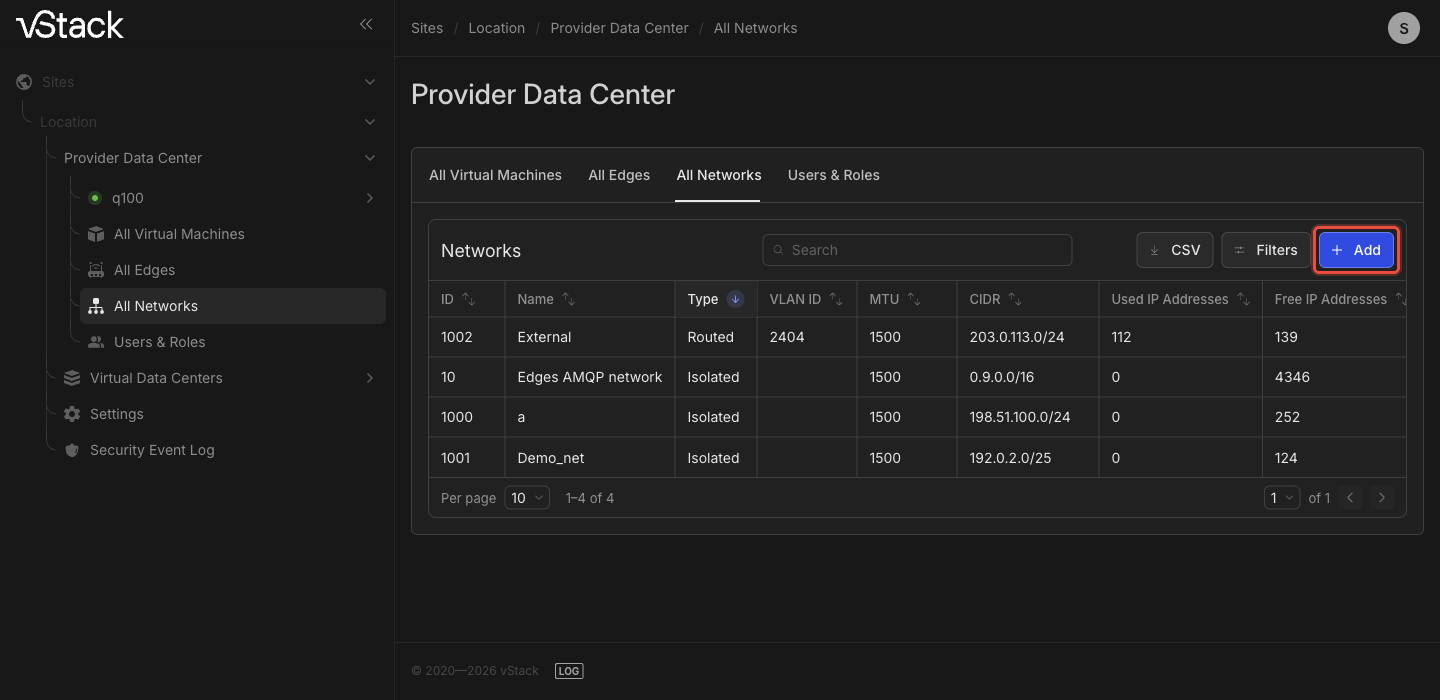
-
Fill out the form:
Field Value to enter TypeNetwork type: Isolated(selected by default),Routed, orQ-in-QNameNetwork name CIDRIPv4 subnet with a prefix from /16 to /29 GatewayDefault gateway: an address within the subnet in CIDR. This field is optional: if left empty, the address is filled in automaticallyMTU1500 by default. The hint next to the field shows the cluster limits; values below 1000 or above 9180 are not accepted VLAN IDThis field appears for RoutedandQ-in-Qtypes. For Q-in-Q, it is the outer tag (S-VLAN)C-VLANThis field appears only for Q-in-Q: the inner tag -
Click
Create a Network. The button remains disabled until all required fields are filled and their values pass validation. -
Wait for the network to appear in the
All Networkstable. Creation is asynchronous: the cluster dispatcher accepts the request and passes it to the network agent, so the record does not appear immediately. Until the network is confirmed, it is too early to assign it to a VDC or connect machines to it. -
Assign the network to a virtual data center (VDC): open the VDC →
Networks,Primarytab, find the network row, and enable the toggle in theAssigncolumn. Without assignment, the VDC's machines cannot see the network.
The creation form builds a network with an IPv4 subnet. A network with an IPv6 subnet or a dual-stack network, where machines receive addresses from both families, is created programmatically. The methods are listed at the end of this page.
If the network was not created
| Code | Cause | Action |
|---|---|---|
-606 "Bad type value" | The network type was not recognized | Select a type from the Type list |
-403 "Access denied" | The role has no permission to create this network type | Only Cluster master can create Routed and Q-in-Q networks; ask a user with this role |
-647 "Empty cidr param value" | The CIDR field is empty | Specify a subnet |
-644 "Bad cidr param value" | The CIDR value cannot be parsed as a subnet | Check the format: network address and prefix separated by a slash |
-646 "You've asked too wide network" | The prefix in CIDR is shorter than /16 | Narrow the subnet; the message specifies the number of bits |
-643 "You've asked too narrow network" | The prefix in CIDR is longer than /29, leaving no addresses for machines | Broaden the subnet |
-680 "default_gw param is NULL" | The gateway was passed as an empty value | Enter an address in Gateway or leave the field unfilled |
-681 "default_gw param has bad value" | The Gateway value cannot be parsed as an IPv4 address | Correct the gateway address |
-682 "default_gw value is out of cidr block" | The address in Gateway is outside the subnet in CIDR | Choose an address within the subnet |
-628 "mtu param value is out of acceptable range (1000-9180)" | The MTU value is outside the allowed range | Set a value from 1000 to 9180 |
-629 "mtu param value exceeds maximal" | MTU is above the cluster maximum | Reduce the value to the maximum shown in the hint next to the field |
-609 "Bad mixup of network type and params" | For a Routed network, the VLAN ID field is empty | Fill in VLAN ID |
-602 "Bad param value for vlan_id" | The number in VLAN ID is outside the range accepted by the cluster | Coordinate the VLAN number with the network administrator |
-610 "Bad param qinq_id", -611 "qinq_id param value is out of acceptable range" | The C-VLAN value cannot be parsed or is outside the range | Correct the inner tag |
-612 "qinq_id param is required for Q-in-Q network type" | The inner tag is not set for the Q-in-Q type | Fill in C-VLAN |
-613 "qinq_id is not allowed for this network type" | The inner tag is set for a type that does not accept it | Change the type to Q-in-Q or remove the inner tag |
-636 "Bad backend param value" | The network backend is set to a negative number; this occurs only in programmatic requests | Keep the default value |
-659 "Failed to obtain cluster status while creating network" | The cluster status is unavailable at the time of the request | Check the cluster status and retry |
-617 "Network creation failed" | The parameters were accepted, but creation did not complete | Retry; if that does not help, check the cluster logs |
-12 "Failed to create network" | The form was accepted, but the network agent did not apply the configuration on the nodes | Check the node status and cluster logs, then create the network again |
Verifying that the network appeared
-
Open
Provider Data Center→All Networks. The new network is in the table with itsID,Type,Name,VLAN ID,MTU,CIDR,Used IP Addresses, andFree IP Addresses. TheSearch in tablefield narrows down a long list, and theCSVbutton exports the entire list.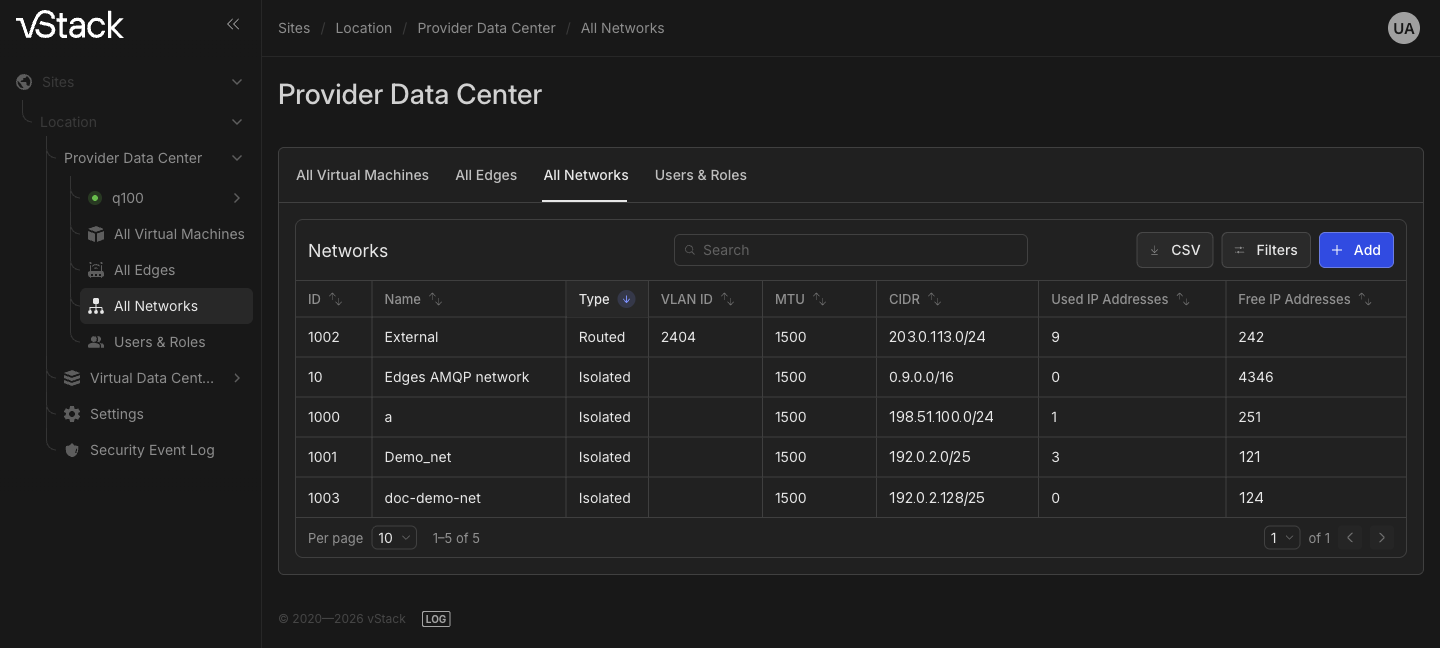
-
Open the network card and expand the
General propertiessection. CheckCIDR,Gateway,MTU, andVLAN IDagainst the values you entered: these fields are read-only. TheLatest changes:row shows when the network was last modified. -
Check the assignment: in the VDC →
Networkssection, on thePrimarytab, the network has itsAssigntoggle enabled. The VDC network list shows only networks assigned to it, subject to the user's permissions.
The network creator can modify and delete the network, while Cluster master can modify and delete any network regardless of who created it.
Renaming a network
The name is the only network parameter that can be changed. The change is synchronous: confirmation arrives immediately.
-
Open
Provider Data Center→All Networksand go to the network card. -
In the
General propertiessection, enter a new name in theNamefield. The other fields,CIDR,Gateway,MTU,VLAN ID, and address counters, are read-only. -
Click
Save changes. The button is disabled until the name changes. -
Verify that the new name appears in the card header and in the
All Networkstable.
The name can be empty; in that case, the network is identified by its ID.
If renaming failed
| Code | Cause | Action |
|---|---|---|
-47301 "No param id" | The network was not identified: the request was sent without an ID | Return to All Networks and reopen the network card |
-47305 "No params has been provided" | The save request was sent without changed fields | Enter a new name, then save |
-403 "Access denied" | The network is assigned to another VDC and was created by another user | Rename it as Cluster master |
-47306 "Network unknown" | The network with this ID no longer exists; it may have been deleted from another session | Refresh the All Networks list |
-78 "Database error" | Database error | Retry; if that does not help, contact support |
Deleting a network
Deletion is asynchronous: the command is sent to the network agent, and the result arrives later.
Cluster master can delete any network; vDC admin can delete only networks they created.
-
Disconnect all consumers from the network: network interfaces of virtual machines and software-defined routers (Edge). While the network is in use, deletion is rejected.
-
Open the network card, click
Actions, and selectDelete Network. The same action is available in the network row in theAll Networkslist. -
Read the warning in the dialog: deletion can affect not only the current VDC but the entire cluster. Confirm with the
Deletebutton, or close the dialog withCancel. -
Wait for the record to disappear from the
All Networkstable. If the network remains in the list, refresh it again: deletion is confirmed by the network agent, rather than by the dialog itself.
If deletion failed
| Code | Cause | Action |
|---|---|---|
The Delete Network action is missing from the Actions menu | You are neither the network creator nor a Cluster master, or the network has a lifecycle or assignment error | Act as Cluster master; resolve the lifecycle error before deletion |
-707 "Network is used still so can't be deleted" | Machines or Edge are connected to the network | Disconnect the consumers and retry |
-403 "Access denied" | The network is assigned to another VDC and was created by another user | Delete it as Cluster master |
-659 "Failed to obtain cluster status while creating network" | The cluster status is unavailable at the time of the request | Check the cluster status and retry |
-722 "Internal database error" | Database error | Retry; if that does not help, contact support |
-12 "Failed to delete network" | The agent did not complete deletion; the network may remain in the node configuration | Check the node status and cluster logs, then retry deletion |
See also
- Cluster networks: types, dual-stack, and address pools— network structure and parameter limits.
- Address pool and VM addressing—what to do after creating a network.
API methods
The API operations covered on this page are nets-create, net-list, net-set,
nets-delete, vdc-assign-network, and vdc-deassign-network. See the
API reference.