Cluster networks: types, dual-stack, and address pools
A network in vStack Center is a cluster-level object. It has a type, a subnet (one for IPv4, one for IPv6, or both), a default gateway, an MTU, and an address pool. Who can create a network depends on its type. Once created, a network is assigned to a virtual data center (VDC), and the VDC's virtual machines connect to it through a network interface and receive an address from the pool.
Creating and deleting a network are asynchronous operations. The cluster dispatcher accepts the request, passes it to the network agent, and responds when it completes: the final result arrives in a separate callback message. Creation therefore has two outcomes: an accepted request and a confirmed network. Between them, the network is not yet ready to accept machines.
Modifying a network, by contrast, is synchronous and very limited: only the name
of an existing network can be changed. The subnet, gateway, MTU, and VLAN ID are fixed at creation. This
is also reflected in the interface, where the network card allows editing only the Name field,
while the others are read-only.
The pool manages addresses within the network. It determines which addresses are free to assign to a machine, which are already used, and which have been excluded by an administrator. The pool works differently for IPv4 and IPv6. This is the main asymmetry to understand before assigning addresses for the first time; a separate section below covers it.
Network types
The type is set at creation and cannot be changed. It determines the required parameters and which role can create the network.
| Type | type value | VLAN ID | C-VLAN (qinq_id) | Who can create it |
|---|---|---|---|---|
| Isolated | 1 | Optional | Not allowed | Cluster master, vDC admin and above |
| Routed | 2 | Required | Not allowed | Cluster master only |
| GENEVE | 3 | Optional | Not allowed | Cluster master, vDC admin and above |
| Q-in-Q | 4 | Required (outer tag, S-VLAN) | Required (inner tag) | Cluster master only |
Both tags are required for Q-in-Q: vlan_id carries the outer tag, and qinq_id carries
the inner tag. For types 1–3, the inner tag is not allowed; a request containing it is rejected.
Network parameters and limits
| Parameter | Default | Limits | Comment |
|---|---|---|---|
cidr | None | Prefix from /16 to /29 | The network's IPv4 subnet |
cidr_v6 | None | Valid IPv6 CIDR | The network's IPv6 subnet |
vlan_id | None | VLAN range accepted by the cluster | S-VLAN for Q-in-Q |
qinq_id | None | VLAN range accepted by the cluster | C-VLAN, only for Q-in-Q |
mtu | 1500 | 1000–9180 and no higher than the cluster maximum | Jumbo Frames within the maximum |
default_gw | None | Address within cidr | IPv4 gateway |
default_gw_v6 | None | Address within cidr_v6 | IPv6 gateway |
backend | 2 | Integer ≥ 0 | Network backend; 2 is NetGraph |
ext_managed_ippool | 0 | — | Indicates that an external system manages the address pool |
At least one subnet is required: a network cannot be created without both cidr and cidr_v6.
The IPv4 prefix is checked against both limits: a subnet that is too broad and one that is too
narrow are rejected with different error codes, and the response text specifies
the number of bits.
Dual-stack: IPv4 and IPv6 in one network
A network can be IPv4-only, IPv6-only, or dual-stack. Both protocols coexist in one object: the network has two subnets and two default gateways, each within its own subnet. A virtual machine on a dual-stack network receives addresses from both families, and they appear together in the list of used addresses, without separation by protocol.
The IPv6 gateway is immediately excluded from assignment: when default_gw_v6 is specified, its address
is automatically added to the list of reserved IPv6 addresses, so it cannot be assigned
to a machine.
Address pool: an allowlist for IPv4, a denylist for IPv6
This is the key difference. For IPv4, the pool is a list of allowed addresses: an address is available for assignment because it is in the pool. For IPv6, the pool is a list of reservations: an address is available because it is not in the reservation list. The same "add an address to the pool" operation therefore has the opposite effect on the underlying data, although it means the same thing: the address can be assigned to a machine again.
| Aspect | IPv4 | IPv6 |
|---|---|---|
| What the pool stores | Allowed addresses | Reserved (excluded) addresses |
| An address is available if | It is in the pool | It is not among the reservations |
| "Add an address to the pool" | Adds a record; the address becomes available | Removes a reservation; the address becomes available |
| "Remove an address from the pool" | Removes a record; the address can no longer be assigned | Adds a reservation; the address can no longer be assigned |
| Free address counter | Calculated from the pool | Calculated as subnet size minus reservations minus assigned addresses |
This asymmetry leads to a practical rule: the allowlist for an IPv6 subnet is never populated. Do not look for entries there after creating the network; management uses reservations.
An empty IPv6 reservation list does not indicate anything either: it remains empty even for a
network with an IPv6 subnet until an IPv6 gateway is set, an administrator excludes addresses, or
a machine receives an IPv6 address. Whether a network has an IPv6 subnet
is determined by cidr_v6, set at creation.
The free IPv6 address counter is limited by its integer width: for broad subnets
(prefix /65 or shorter, including the usual /64), the number of addresses does not fit in
a signed 64-bit integer, so -1 is returned instead. This is not an error; it
means "too many to count". An exact number is available only for narrow
IPv6 subnets; for a network without an IPv6 subnet, the counter is 0.
What the interface shows
| Screen | Contents | Purpose |
|---|---|---|
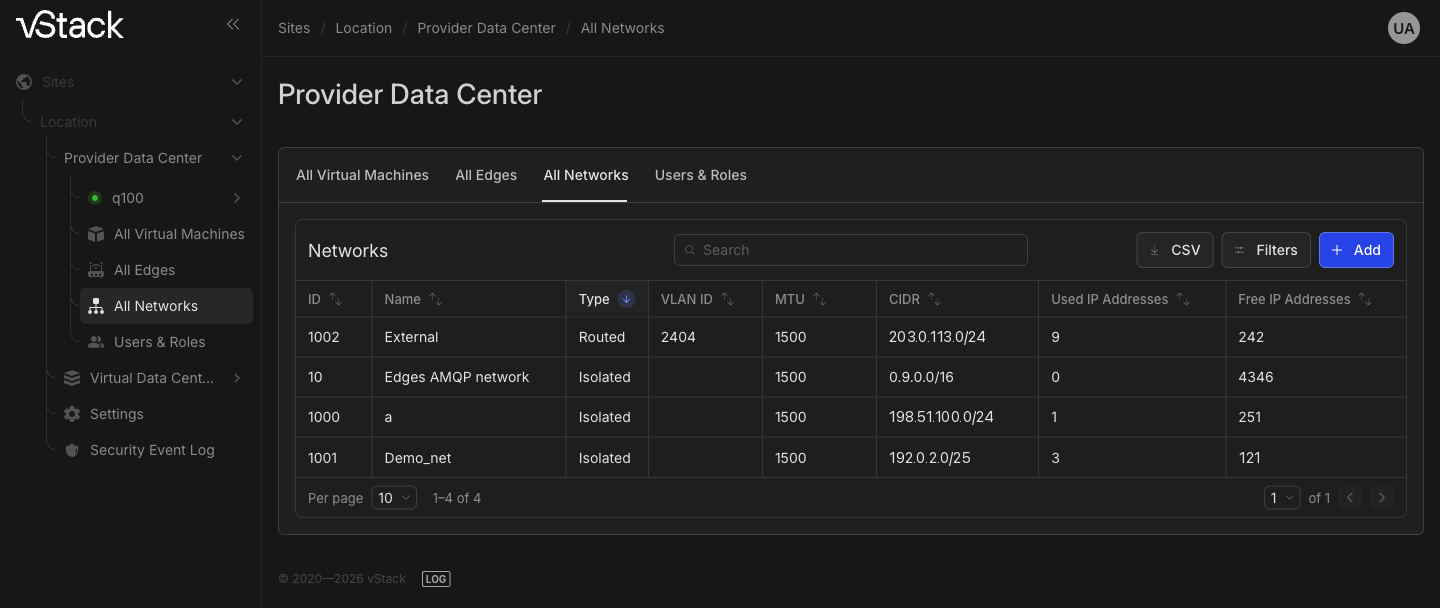
Provider Data Center → All Networks | Table with ID, Type, Name, VLAN ID, MTU, CIDR, Used IP Addresses, Free IP Addresses, and CSV export | All cluster networks and their available addresses |
| Network card | Form with editable Name and read-only fields; General properties, IPPool usage, and IPPool space sections | Network parameters, used addresses broken down by VDC, and pool counters |
VDC → Networks, Primary tab | Table with an Assign column | Networks assigned to this VDC |
VDC → Networks, IP Data tab | Used IP addresses by this vDC, Used IP Addresses, Free IP Addresses, Addrs limit | How many addresses the VDC has used and its limit |
VM card, Networks section | Table with ID, Name, Slot, Port, MAC, IP, IP guard, MBps limit | The address received by the machine |
The IPPool space section on the network card divides addresses into three counters: free,
used, and absent from the pool. The third counter follows directly from the IPv4
allowlist logic: the address is within the subnet but cannot be assigned until it is added to
the pool.
Limitations to know in advance
| Limitation | Reason | Action |
|---|---|---|
| Only a network's name can be changed | The subnet, gateway, MTU, and VLAN tags are fixed at creation | Create a new network with the required parameters and switch the machines to it |
| A network with connected consumers cannot be deleted | Deletion would break connectivity for running machines | Disconnect the interfaces of machines and software-defined routers (Edge) from the network, then delete it |
vDC admin cannot create routed or Q-in-Q networks | These types affect external routing and VLAN tagging across the cluster | Ask a user with the Cluster master role to create the network |
The free IPv6 counter shows -1 | The subnet is broader than /65, and its size is not calculated | Use the list of reservations and assigned addresses as a guide, or use a narrow subnet |
vDC admin can modify and delete only their own networks | For these roles, object ownership is tied to the creator | Act as Cluster master: this role can modify and delete any network regardless of who created it |
See also
- How to create and manage a network—creation, renaming, and deletion.
- Address pool and VM addressing—viewing the pool, excluding addresses, and tracking assigned addresses.
API methods
The API operations covered on this page are nets-create, net-list, net-set,
nets-delete, net-ippool-show, and net-ippool-free. See the
API reference.